May 25, 2025Black Box, Blood MoneyIn May 2025, in a luxury Manhattan townhouse, a man hung suspended over a five-story stairwell. His captors—led by crypto investor John Woeltz—had already beaten him and held a gun to his head...
Continue reading "Black Box, Blood Money"
Posted by David at 08:46 AM
| Comments (0)
April 13, 2025Credibility, not CapabilityThe most important thing we build in technology and academia is not capability, but credibility. It does not matter how fast we calculate, how smart we are, or the brilliance of the products or papers we make, if we cannot answer the question "Why should anybody believe anything we say?" Continue reading "Credibility, not Capability"Posted by David at 10:03 AM
| Comments (2)
March 29, 2025MisgivingsIn my life I have paid a lot of tax. And every year, after participating in debates about how to spend it all—town, state, and country—I have been proud to write each tax check even when I disagree with the decisions. This is the first year I have had serious misgivings. Posted by David at 05:28 AM
| Comments (0)
March 25, 2025Freedom and PurposeI spent 20 years making products in industry before switching to teach in academia, so I am frequently asked to compare the two paths by PhD students (and prosepctive PhD students) who are facing the choice between them. Here is my answer: industry and academia fundamentally have two different missions, and when choosing between them you should think about what kind of impact you would like to have on the world.... 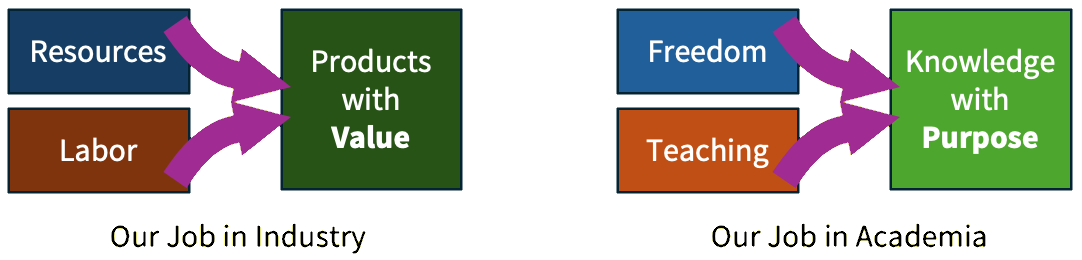 Posted by David at 07:17 AM
| Comments (1)
February 21, 2025What it Means to be HumanMy academic field of artificial intelligence continues to barrel ahead, unrelenting, towards the goal of surpassing human cognition. So in my work I frequently confront the question: what do we envision as the purpose of the human in the world that we are creating? Already an AI can plan, reason, write, and solve complex problems faster and better than a human mind. As these capabilities continue to grow, what role do we envision for the humans? Continue reading "What it Means to be Human"Posted by David at 08:29 PM
| Comments (1)
March 28, 2024The Right Kind of Openness for AIThere is a false dichotomy between two alternatives facing us in the burgeoning AI industry today: "open" versus "closed." This dichotomy is being promoted by both sides: Closed-AI advocates (oddly, including the company named "Open AI") justifiably warn about the misuse risks posed by unregulated use of AI and the geopolitical risks posed by exfiltration of weights of large-scale pretrained models, but then they falsely imply that the only solution to these risks is to lock their AI behind an opaque service interface, with no visibility to the internals provided to outsiders. On the other hand, open-AI advocates (including Yann LeCun, one of the giants of our field) correctly point out the huge community benefits that come from transparency and competition, but then they make the mistake of assuming that benefits will be guaranteed if they throw their trained models over the wall to the public, releasing full model weights openly. Both sides are bankrolled by massive monetary investments and project the polished air of billion-dollar confidence. But the ugly truth is that the AI industry is built around an extraordinary uncertainty: although the industry has become expert in the science of creating AI, we are pitifully unequipped to meet the challenge of understanding AI. This unprecedented state of affairs is a direct outgrowth of the nature of modern machine learning: our clever training processes have created systems that contain orders of magnitude more complexity than has ever been created in software before, but no human has examined it. Beyond a superficial level, we do not currently understand what is good or bad or smart or stupid inside these systems. The long-term risk for humanity comes from our ignorance about the limitations, capabilities, and societal impacts of AI as we continue to develop it. Neither the open nor closed models on their own offer a credible path to cracking this problem. Thus we ask: what is the right kind of openness? What ecosystem will lead to a healthy AI industry, built on strong science, transparency, accountability, and innovation? In the talk and paper I have posted at resilience.baulab.info, I discuss the need for a middle path. We do not need to foreclose either or nor closed strategies, but we need a framework of standards and services that will create healthy incentives for companies to pursue vigorous innovation, meaningful transparency, and safety in the public interest. Posted by David at 06:08 AM
| Comments (2)
March 16, 2024ReinventedFollowing my 2017 blog entry, Reinvention, where I had looked back to recount my jump from industry back to academia. Here is a video from the CSAIL 60th anniversary celebration where I finish telling my personal academic story about a career reinvention. If you watch it to the end, you can see the three big lessons about how to do research that I learned during my PhD - and how I learned those lessons. Continue reading "Reinvented"Posted by David at 05:27 PM
| Comments (1)
October 28, 2023Function Vectors in Large Language ModelsIn 1936, Alonzo Church made an amazing discovery: if a function can treat other functions as data, then it becomes so powerful that it can even express unsolvable problems. We know that deep neural networks learn to represent many concepts as data. Do they also learn to treat functions as data? In a new preprint, my student Eric Todd finds evidence that deep networks do contain function references. Inside large transformer language models (like GPT) trained on ordinary text, he discovers internal vectors that behave like functions. These Function Vectors (FVs) can be created from examples, invoked in different contexts, and even composed using vector algebra. But they are different from regular word-embedding vector arithmetic because they trigger complex calculations, rather than just making linear steps in representation space. Read and retweet the Twitter thread Posted by David at 11:17 AM
| Comments (0)
April 02, 2023Is Artificial Intelligence Intelligent?The idea that large language models could be capable of cognition is not obvious. Neural language modeling has been around since Jeff Elman’s 1990 structure-in-time work, but 33 years passed between that initial idea and first contact with ChatGPT. What took so long? In this blog I write about why few saw it coming, why some remain skeptical even in the face of amazing GPT-4 behavior, why machine cognition may be emerging anyway, and what we should study next. Read more at The Visible Net. Posted by David at 03:08 PM
| Comments (0)
March 28, 2023Catching UpToday, I received an email from my good college friend David Maymudes. David got his math degree from Harvard a few years ahead of me, and we have both worked at Microsoft and Google at overlapping times. He is still at Google now. We have both witnessed and helped drive major cycles of platform innovation in the industry in the past (David designed the video API for windows and created the AVI format! And we both worked on Internet Explorer), so David is well aware of the important pieces of work that go into building a new technology ecosystem. From inside Google today, he is a direct witness to the transformation of that company as the profound new approaches to artificial intelligence become a corporate priority. It is obvious that something major is afoot: a new ecosystem is being created. Although David does not directly work on large-scale machine learning, it touches on his work, because it is touching everybody. Despite being an outsider to our field, David reached out to ask some clarifying questions about some specific technical ideas, including RLHF, AI safety, and the new ChatGPT plug-in model. There is so much to catch up on. In response to David’s questions, I wrote up a crash-course in modern large language modeling, which we will delve into in a new blog I am creating. Read more at The Visible Net. Posted by David at 05:44 AM
| Comments (0)
December 28, 2021Running Statistics for PytorchHere is runningstats.py, a useful little module for computing efficient online GPU statistics in Pytorch. Pytorch is great for working with small batches of data: if you want to do some calculations over 100 small images, all the features fit into a single GPU and the pytorch functions are perfect. But what if your data doesn't fit in the GPU all at once? What if they don't even fit into CPU RAM? For example, how would you calculate the median values of a set of a few thousand language features over all of Wikipedia tokens? If the data is small, it's easy: just sort them all and take the middle. But if they don't fit - what to do?
import datasets, runningstats
ds = datasets.load_dataset('wikipedia', '20200501.en')['train']
q = runningstats.Quantile()
for batch in tally(q, ds, batch_size=100, cache='quantile.npz'):
  feats = compute_features_from_batch(batch)
  q.add(feats) # dim 0 is batch dim; dim 1 is feature dim.
print('median for each feature', q.quantile(0.5))
Here, online algorithms come to the rescue. These are economical algorithms that summarize an endless stream of data using only a small amount of memory. Online algorithms are particularly handy for digesting big data on a GPU where memory is precious. runningstats.py includes running Stat objects for Mean, Variance, Covariance, TopK, Quantile, Bincount, IoU, SecondMoment, CrossCovariance, CrossIoU, as well as an object to accumulate CombinedStats.... Continue reading "Running Statistics for Pytorch"Posted by David at 02:23 PM
| Comments (0)
November 26, 2021Reddit AMAJoin me at this link on Reddit on Tuesday 3pmET/12PT to #AMA about interpreting deep nets, AI research in academia vs industry; life as a PhD student. I am a new CS Prof at Northeastern @KhouryCollege; postdoc at Harvard; recent MIT Phd; Google, Msft, startups... It is graduate school application season! So with prospective PhD students in mind, I am hosting an AMA to talk about life as a PhD student in computer vision and machine learning, and the choice between academia and industry. My research studies the structure of the computations learned within deep neural networks, so I would especially love to talk about why it is so important to crack open deep networks and understand what they are doing inside. Before I start as a professor at Northeastern University Khoury College of Computer Sciences next year, I am doing a postdoc at Harvard; and you can see my recent PhD defense at MIT here. I have a background in industry (Google, Microsoft, startup) before I did my own "great resignation” to return to school as an academic, so ask me anything about basic versus applied work, or research versus engineering. Or ask me about “grandmother neurons,” making art with deep networks, ethical conundrums in AI, or what it's like to come back to academia after working. Posted by David at 11:21 AM
| Comments (1)
August 25, 2021Assistant Professor at NEU KhouryI am thrilled to announce that I will be joining the Northeastern University Khoury College of Computer Science as an Assistant Professor in Fall 2022. For prospective students who are thinking of a PhD, now is a perfect time to be thinking about the application process for 2022. Drop me a note if you have a specific interest in what our lab does. And if you know somebody who would be a fit, please share this! http://davidbau.com/research/ We think that understanding the rich internal structure of deep networks is a grand and fundamental research question with many practical implications. (For a talk about this, check out my PhD defense). If this area fascinates you, consider applying! The NEU Khoury school is in downtown Boston, an exciting, international city, and the best place in the world to be a student. Posted by David at 06:48 PM
| Comments (1)
August 24, 2021PhD DefenseToday I did my PhD defense, and my talk will be posted here on youtube. Here is the talk! Title: Dissection of Deep Networks Do deep networks contain concepts? One of the great challenges of neural networks is to understand how they work. Because a deep network is trained by an optimizer, we cannot ask a programmer to explain the reasons for the specific computations that it happens to do. So we have traditionally focused on testing a network's external behavior, ignorant of insights or flaws that may hide within the black box. But what if we could ask the network itself what it is thinking? Inspired by classical neuroscience research on biological brains, I introduce methods to directly probe the internal structure of a deep convolutional neural network by testing the activity of individual neurons and their interactions. Beginning with the simple proposal that an individual neuron might represent one internal concept, we investigate the possibility of reading human-understandable concepts within a deep network in a concrete, quantitative way: Which neurons? Which concepts? What role do concept neurons play? And can we see rules governing relationships between concepts? Following this inquiry within state-of-the-art models in computer vision leads us to insights about the computational structure of those deep networks that enable several new applications, including "GAN Paint" semantic manipulation of objects in an image; understanding of the sparse logic of a classifier; and quick, selective editing of generalizable rules within a fully trained StyleGAN network. In the talk, we challenge the notion that the internal calculations of a neural network must be hopelessly opaque. Instead, we strive to tear back the curtain and chart a path through the detailed structure of a deep network by which we can begin to understand its logic. Posted by David at 03:13 PM
| Comments (0)
August 06, 2021Global CatastrophizingDo you think the world is much darker than it used to be? If so, you are not alone. I have always assumed that a feeling of psychological decline is just a side-effect of getting older. But a paper by Bollen, et al., out in PNAS today suggests that a darker outlook in recent years might not be specific to any of us individually. By analyzing trends in published text in the Google ngrams corpus, researchers from Indiana University and Wageningen have discovered that across English, Spanish and German, text published in the world shows sudden changes in language use over time that are indicative of cognitive distortions and depression, coinciding with major wars or times of social upheaval. 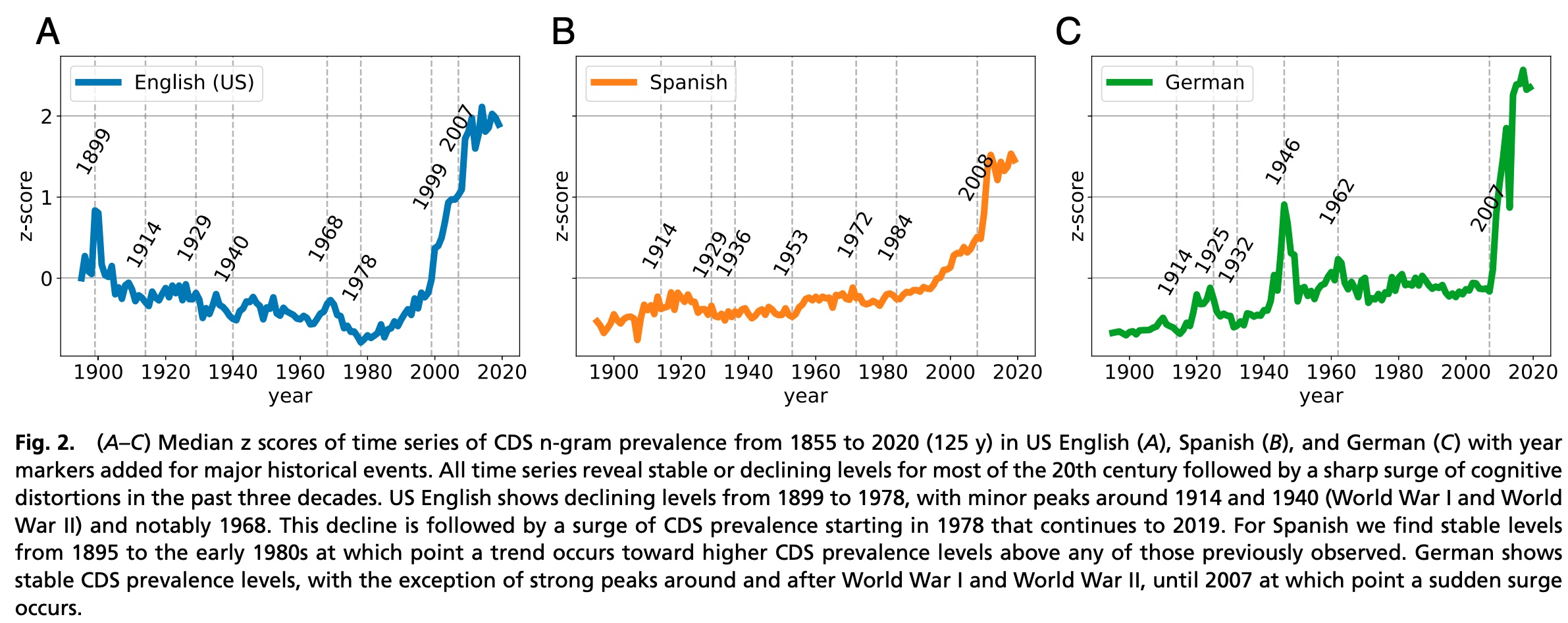 The chart above is from Bollen's paper, and it counts something very simple. For every year, it counts how many times a particular set of short phrases appear in the printed books published in that year. The annual counts come from Google's Books ngram corpus - derived from scans of published books - and the 241 phrases counted are word sequences chosen by a panel of cognitive behavioral therapy specialists as markers for cognitive distortion schemata (CDS). That is, they are phrases that would suggest systematic errors in thinking that are correlated with mental health issues that are treated by psychologists. For example, one of the 241 counted phrases is "you always," because those words often indicate overgeneralization such as in the sentences "You always say no," or "You always win." The bigram "everyone knows" indicates mind-reading, because it reveals that the speaker has a belief that they know what other people are thinking. The trigram "will never end" indicates catastrophizing, an exaggerated view of negative events. In total the panel of experts cataloged each of the 241 selected phrases, as a marker for a dozen specific cognitive distortions. These cognitive distortions are correlated with depression, so it is interesting to ask whether large-scale trends in the usage of these phrases reveals mass changes in psychology over time. The chart suggests that it might. It seems to reveal suffering in Germany coinciding with World Wars I and II, and trauma in the English-speaking world at the Spanish-American War, Vietnam war protests, and 9/11. Strikingly and worryingly, all the languages show a dramatic increase in cognitively distorted use of language since 2007. If you believe the linguistic tea leaves, our collective state of mind seems to have taken an extraordinary turn for the worse in the last decade — globally. The paper is an example of a use of the Google Books ngrams corpus. This is a pretty great resource that catalogs language use by counting words and ngrams in about 4% of all published text, by year, and it means that you can easily look further into the data yourself. The authors provide their list of phrases, so you can examine the trends by individual category and phrase. Here are the top phrases for catastrophizing in English: 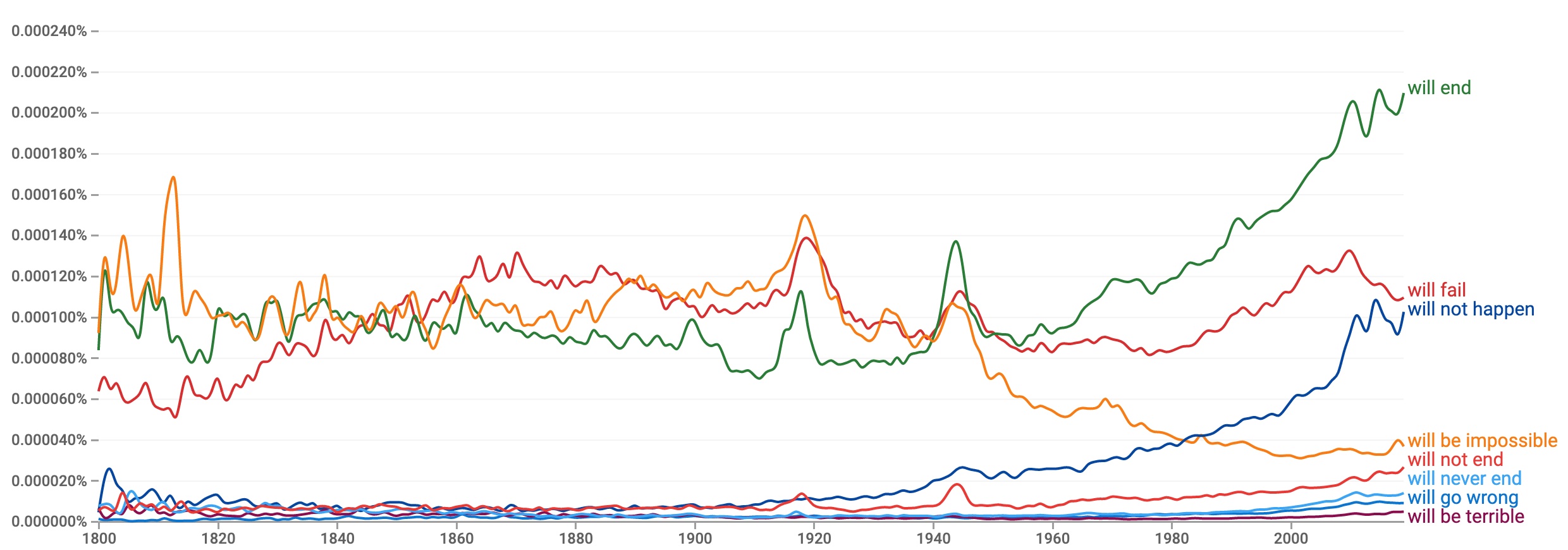 Explore and modify the query yourself here. You can see spikes in certain phrases corresponding to WWI and WWII, and the upwelling, in recent decades, of expressions of the idea that a variety of things "will end" and "will not happen". It is when the 241 phrases are added together, when we see dramatic recent spikes that are reminiscent of the climate change hockey stick plot by Mann, Bradley and Hughes. Do you agree with the authors that these changes in word usage are meaningful? Have we been experiencing a catastrophic worldwide decline in psychological health since 2007? Or is this just an example in which the authors themselves are catastrophizing, looking at data in a way that interprets events in the world as much worse than they actually are? Previous musings on society-wide catastrophizing here. Posted by David at 08:10 AM
| Comments (0)
March 18, 2021Passwords should be illegalAs part of modernizing U.S. infrastructure, America should eliminate passwords. Our use of passwords to build security on the internet is akin to using flammable materials to build houses in densely-populated cities. Every single website that collects, stores and transmits password invites a new cybersecurity catastrophe. When half of Chicago burned down in 1871, citizens reflexively blamed the disaster on evil actors: arsonists, immigrants, communists. After the fire, the first response of political leaders was to impose martial law on the city to stop such evil-doers. From our modern perch, it seems obvious that the blame and the fix was misplaced. Even if the spark were lit by somebody with bad intentions, the scale of the disaster was caused by outdated infrastructure. Chicago had been built out of combustible materials that were not safe in a densely-built city. Our continued use of passwords on the internet today poses the same risk. Just as a small fire in a flammable city can turn into a massive disaster, on the internet, a single compromised password can lead to a chain reaction of compromised secrets that can open vast parts of the internet to hacking. The fundamental problem is that we store and transmit many of the secrets that we use to secure the internet, including passwords, on the internet itself. In the 2020's using, transmitting, and storing passwords on the internet should be as illegal as constructing a Chicago shanty out of incendiary cardboard. Physical key-based authentication systems are cheap. They keep secrets secure on computer chips that are not connected to the internet and that never reveal their secrets on the network. If physical keys were used everywhere we currently use passwords, all internet hacking would be far harder and slower. Key-based login systems have been available for decades, but because standards are not mandated, they are adopted almost nowhere. Physical keys are slightly more inconvenient for system-builders, and consumers do not demand them because the dangers of hacking are invisible. It is an excellent example of a situation where change is needed, but the marketplace will not create the change on its own. That is why our country's best response to the increasing wave of hacking disasters should be led by people like the folks at NIST, rather than the U.S. Army. We should standardize, incentivize, mandate, and fund the use of non-password based authentication in all computer systems over the next few years. A common set of standards should be set, so that people can log into all systems using trustworthy physical keys that cannot be hacked remotely. Eliminating passwords would make more of a difference to cybersecurity than any clever retaliation scheme that the cybersecurity soldiers might cook up. Although there are certainly evil actors on the internet, we ourselves are the ones who empower hackers by perpetuating our own dangerous practices. As we modernize U.S. infrastructure, we should prioritize modernizing standards and requirements around safe authentication systems on the internet.
Posted by David at 12:28 PM
| Comments (2)
October 16, 2020Deception is a BugToday Twitter and Facebook decided to manually limit the spread of the NY Post's unverified story about a hack on the Biden family. Taking responsibility for some of the broad impacts of their systems is an excellent move. But the fact that FB+Twitter needed to intervene is a symptom of badly flawed systems. We all know that the systems would have otherwise amplified the misinformation and caused widespread confusion. In other words, we all know our big social networks have a bug. It is a fundamental bug with ethical implications - but in the end, it is a bug, and as engineers we need to learn to fix this kind of issue. As a field, we need to be willing to figure out how to design our systems to be ethical. To be good. What does it mean for an AI to be good? The fundamental reason Twitter and Facebook and Google are having such problems is that the objectives used to train these systems are wrong. We can easily count clicks, minutes of engagement, re-shares, transactions. So we maximize those. But we know that these are not actually the right goals. The right goal? In the end, a system serves users, and so its purpose is to expand human agency. A good AI must help human users make better decisions. Yet improving decisions is quite a bit harder than maximizing page views. It requires getting into subtle issues, developing an understanding of what it means to be helpful, informative, honest. And it means being willing to take on tricky choices that have traditionally been the realm of editors and policymakers. But it is possible. And, as a field, it is what we should be aiming for. A few more thoughts in previous posts: Posted by David at 12:42 PM
| Comments (1)
August 19, 2020Rewriting a Deep Generative ModelCan the rules in a deep network be directly rewritten? State-of-the-art deep nets are trained as black boxes, using huge piles of data and millions of rounds of optimization that can take weeks to complete. But what if we want change a learned program after all that training is done? Since the start of my PhD I have been searching for a way to reprogram huge deep nets in a different way: I want to reconfigure learned programs by plugging pieces together instead of retraining them on big data sets. In my quest, I have found a lot of cool deep net structure and developed methods to exploit that structure. Yet most ideas do not work. Generalizable editing is elusive. Research is hard. But now, I am delighted to share this finding: Rewriting a Deep Generative Model (ECCV 2020 oral)
Unlike my GanPaint work, the focus of this paper is not on changing a single image, but on editing the rules of the network itself. To stretch a programming analogy: in previous work we figured out how to edit fields of a single neural database record. Now we aim to edit the logic of the neural program itself. Here is how: to locate and change a single rule in a generative model, we treat a layer as an optimal linear associative memory that stores key-value pairs that associate meaningful conditions with visible consequences. We change a rule by rewriting a single entry of this memory. And we enable users to make these changes by providing an interactive tool. I edit StyleGanV2 and Progressive GAN and show how to do things like redefine horses to let them wear hats, or redefine pointy towers to have buildings that sprout trees. My favorite effects are redefining kids eyebrows to be very bushy, and redefining the rule that governs reflected light in a scene, to invert the presence of reflections from windows. Here is a 10 min video: MIT news has a story about it here today: Posted by David at 11:11 AM
| Comments (2)
|
||||||||||||||||||||||||||||||||||||||||||
|
Calendar
Projects
Search
Recent Entries
Black Box, Blood Money
Credibility, not Capability Misgivings Freedom and Purpose What it Means to be Human The Right Kind of Openness for AI Reinvented Function Vectors in Large Language Models Is Artificial Intelligence Intelligent? Catching Up Running Statistics for Pytorch Reddit AMA Assistant Professor at NEU Khoury PhD Defense Global Catastrophizing Passwords should be illegal Deception is a Bug Rewriting a Deep Generative Model David's Tips on How to Read Pytorch A COVID Battle Map COVID-19 Chart API The Beginning No Testing is not Cause for Optimism Two Views of the COVID-19 Crisis The Purpose of AI npycat for npy and npz files In Code We Trust? Net Kleptocracy It's Our Responsibility Volo Ergo Sum A Crisis of Purpose Reinvention Government is Not the Problem Oriental Exclusion David Hong-Toh Bau, Sr Dear Senator Collins Trump is a Two-Bit Dictator Network Dissection Learnable Programming Beware the Index Fund Does Watching Fox News Kill You? Our National Identity Outrage is Not Enough A Warning From 1937 Nativist? A Demon-Haunted World By the People, For the People Integrity in Government Thinking Slow Whose Country? Starting at MIT When to Sell One-Off Depreciation Confidence Games Making a $400 Linux Laptop Teaching About Data Code Gym Musical.js Pencil Code at Worcester Technical High School A Bad Chrome Bug PhantomJS and Node.JS Integration Testing in Node.js Second Edition of Pencil Code Learning to Program with CoffeeScript Teaching Math Through Pencil Code Hour of Code at Lincoln Hour of Code at AMSA A New Book and a Thanksgiving Wish Pencil Code: Lesson on Angles Pencil Code: Lesson on Lines Pencil Code: a First Look CoffeeScript Syntax for Kids CSS Color Names For Versus Repeat Book Sample Page Teaching Programming and Defending the Middle Class TurtleBits at Beaver Country Day Book Writing Progress Lessons from Kids Await and Defer Ticks, Animation, and Queueing in TurtleBits Using the TurtleBits Editor Starting with Turtlebits Turtle Bits No Threshold, No Limit Local Variable Debugging with see.js Mapping the Earth with Complex Numbers Conformal Map Viewer Jobs in 1983 The Problem With China Omega Improved Made In America Again Avoiding Selectors for Beginners Turtle Graphics Fern with jQuery Learning To Program with jQuery jQuery-turtle Python Templating with @stringfunction PUT and DELETE in call.jsonlib.com Party like it's 1789 Using goo.gl with jsonlib
Archives
All Articles
May 2025 April 2025 March 2025 February 2025 March 2024 October 2023 April 2023 March 2023 December 2021 November 2021 August 2021 March 2021 October 2020 August 2020 July 2020 April 2020 March 2020 January 2018 December 2017 November 2017 June 2017 May 2017 April 2017 March 2017 January 2017 December 2016 November 2016 October 2016 June 2016 May 2016 September 2015 August 2015 July 2015 October 2014 July 2014 May 2014 January 2014 December 2013 November 2013 October 2013 September 2013 August 2013 April 2013 February 2013 October 2012 September 2012 December 2011 November 2011 October 2011 September 2011 March 2011 February 2011 January 2011 December 2010 November 2010 October 2010 September 2010 June 2010 May 2010 April 2010 March 2010 February 2010 January 2010 November 2009 September 2009 August 2009 July 2009 June 2009 May 2009 April 2009 March 2009 February 2009 January 2009 December 2008 November 2008 October 2008 September 2008 August 2008 June 2008 May 2008 March 2008 February 2008 January 2008 December 2007 November 2007 October 2007 August 2007 July 2007 June 2007 May 2007 April 2007 March 2007 February 2007 January 2007 December 2006 November 2006 October 2006 September 2006 August 2006 July 2006 June 2006 May 2006 April 2006 March 2006 February 2006 January 2006 December 2005 October 2005 September 2005 August 2005 July 2005 June 2005 May 2005 April 2005 January 2004 December 2003 November 2003
Links
Bau family website
Joe
Gary
Eric
Gayle
Reza
Ulysses
Blossom
Howie
Nelson
Glenn
Sacca
Davidmay
Pop
Wag
Physics
Nature
MG
LegoEd
Cedric
Adam
Mark
Scott
Ted
Joel
XMLBeans
Quick Search Bar
Battelle
Bricklin
Digg
Jake
Gilmour
Googlers
HotLinks
Mini
Raymond
RB
RMack
Sam
TM
Volkh
Wonkette
Waxy
Witt
Xooglers
Zawodny
EconView
UChicagoLaw
Older Writing
About


 |
||||||||||||||||||||||||||||||||||||||||||
| Copyright 2025 © David Bau. All Rights Reserved. | ||||||||||||||||||||||||||||||||||||||||||